

Business Mail
Professional email on your own domain: fast webmail, one-tap setup on phones and Outlook, spam and virus filtering, and free migration from your current provider.
- Support from Türkiye
- Spam and virus filtering
- DKIM, SPF and DMARC ready
- Free migration
- 200mailboxes migrated at once from one CSV file
- 2048-bitDKIM signing ready on every domain
- 1 clickwebmail sign-in from your client area
- 15 daysyour data is kept after cancellation
Choose your mailbox plan
Every plan includes webmail, web calendar and contacts, IMAP/POP3/SMTP, spam filtering and free migration. Add users, accounts or storage as your team grows.
No plans match the selected criteria. Try changing the filters.
Mail 5 GB
| Billing Cycle | Total | Per Month |
|---|---|---|
| Monthly | ||
| Quarterly | ||
| Semi-Annually | ||
| Annually | ||
| Biennially | ||
| Triennially |
- Storage per mailbox: 5 GB
- Pricing: Per user
- Sending per mailbox: 100/hour
- Web calendar and contacts (CalDAV/CardDAV): Included
- ActiveSync (Exchange): Add-on
- IMAP and PST migration: Free
Mail 10 GB
| Billing Cycle | Total | Per Month |
|---|---|---|
| Monthly | ||
| Quarterly | ||
| Semi-Annually | ||
| Annually | ||
| Biennially | ||
| Triennially |
- Storage per mailbox: 10 GB
- Pricing: Per user
- Sending per mailbox: 100/hour
- Web calendar and contacts (CalDAV/CardDAV): Included
- ActiveSync (Exchange): Add-on
- IMAP and PST migration: Free
Mail 25 GB
| Billing Cycle | Total | Per Month |
|---|---|---|
| Monthly | ||
| Quarterly | ||
| Semi-Annually | ||
| Annually | ||
| Biennially | ||
| Triennially |
- Storage per mailbox: 25 GB
- Pricing: Per user
- Sending per mailbox: 100/hour
- Web calendar and contacts (CalDAV/CardDAV): Included
- ActiveSync (Exchange): Add-on
- IMAP and PST migration: Free
Mail 50 GB
| Billing Cycle | Total | Per Month |
|---|---|---|
| Monthly | ||
| Quarterly | ||
| Semi-Annually | ||
| Annually | ||
| Biennially | ||
| Triennially |
- Storage per mailbox: 50 GB
- Pricing: Per user
- Sending per mailbox: 100/hour
- Web calendar and contacts (CalDAV/CardDAV): Included
- ActiveSync (Exchange): Add-on
- IMAP and PST migration: Free
Mail 100 GB
| Billing Cycle | Total | Per Month |
|---|---|---|
| Monthly | ||
| Quarterly | ||
| Semi-Annually | ||
| Annually | ||
| Biennially | ||
| Triennially |
- Storage per mailbox: 100 GB
- Pricing: Per user
- Sending per mailbox: 100/hour
- Web calendar and contacts (CalDAV/CardDAV): Included
- ActiveSync (Exchange): Add-on
- IMAP and PST migration: Free
Mail 150 GB
| Billing Cycle | Total | Per Month |
|---|---|---|
| Monthly | ||
| Quarterly | ||
| Semi-Annually | ||
| Annually | ||
| Biennially | ||
| Triennially |
- Storage per mailbox: 150 GB
- Pricing: Per user
- Sending per mailbox: 100/hour
- Web calendar and contacts (CalDAV/CardDAV): Included
- ActiveSync (Exchange): Add-on
- IMAP and PST migration: Free
Office 15 Mailboxes
| Billing Cycle | Total | Per Month |
|---|---|---|
| Monthly | ||
| Quarterly | ||
| Semi-Annually | ||
| Annually | ||
| Biennially | ||
| Triennially |
- Mailboxes: 15
- Shared total storage: 100 GB
- Sending per mailbox: 100/hour
- Web calendar and contacts (CalDAV/CardDAV): Included
- ActiveSync (Exchange): Add-on
- IMAP and PST migration: Free
Business 30 Mailboxes
| Billing Cycle | Total | Per Month |
|---|---|---|
| Monthly | ||
| Quarterly | ||
| Semi-Annually | ||
| Annually | ||
| Biennially | ||
| Triennially |
- Mailboxes: 30
- Shared total storage: 200 GB
- Sending per mailbox: 100/hour
- Web calendar and contacts (CalDAV/CardDAV): Included
- ActiveSync (Exchange): Add-on
- IMAP and PST migration: Free
Enterprise 60 Mailboxes
| Billing Cycle | Total | Per Month |
|---|---|---|
| Monthly | ||
| Quarterly | ||
| Semi-Annually | ||
| Annually | ||
| Biennially | ||
| Triennially |
- Mailboxes: 60
- Shared total storage: 300 GB
- Sending per mailbox: 100/hour
- Web calendar and contacts (CalDAV/CardDAV): Included
- ActiveSync (Exchange): Add-on
- IMAP and PST migration: Free
Choose your mailbox count and storage
If the ready-made plans don't fit, pick the number of mailboxes and the shared storage yourself; the price updates instantly.
₺55,47 per mailbox · ₺27,45 per 5 GB
Price: a base price for 1 mailbox + 5 GB, plus a unit price for each extra mailbox and each extra 5 GB.
Mailboxes share the storage; one mailbox can have up to 150 GB (or the whole shared storage). You can increase later and decrease at renewal.
Prices shown in TRY. Prices exclude VAT; VAT is added at checkout.
Add only what you need
Add them when you order or later from the client area. Add-ons are billed on the same cycle as your plan.
-
All plans
Exchange ActiveSync
Connect iPhone, Android and Outlook as an Exchange account: mail, calendar and contacts in one account. Bought per mailbox; you choose which mailboxes have it.
₺55,47/mo · per mailbox +VAT
-
All plans
Email archive
A tamper-proof copy of every incoming and outgoing message. 10, 25 or 50 GB; 1, 3 or 10 years of retention. Per domain.
from ₺100,29/mo · per domain +VAT
-
Per-user plans
Additional user
Each additional user adds one mailbox with the same storage as your plan, at your plan's per-user price.
At your plan's per-user price
-
Shared-storage plans
Extra account
Raises the mailbox count; the new mailbox uses the plan's shared storage.
₺55,47/mo · per mailbox +VAT
-
Shared-storage plans
Extra storage
Grow the plan's shared total storage in 10 GB steps.
₺44,26/mo · per 10 GB +VAT
Web calendar and contacts, shared calendars, two-factor sign-in, quarantine, delivery log, deleted-mail restore and migration are free on every plan.
Everything a business inbox needs
No control panel to learn: mailboxes, passwords, forwarding and DNS instructions all live in your Gyro client area.
Webmail anywhere
Read and send from any browser with a clean, fast webmail on your own address.
Phone and Outlook in minutes
Automatic setup (Autodiscover/Autoconfig) for Outlook, iPhone, Android and Thunderbird. No server names to type.
Spam and virus filtering
Incoming mail is scanned for spam, phishing and viruses before it reaches your inbox.
DKIM, SPF and DMARC ready
Every domain is signed with DKIM and comes with the right SPF and DMARC records, so your mail lands in the inbox.
Support from Türkiye
Real people who know email: we help with DNS, devices and migration in your language.
Secure and backed up
Encrypted connections (TLS) everywhere, sending limits that protect your reputation and daily backups.
DNS record check
The client area checks your MX, SPF, DKIM and DMARC records live and shows the records to add, ready to copy.
Aliases, forwarding, catch-all
Share sales@ with several people, forward while keeping a copy, and collect mistyped addresses in one mailbox.
Auto reply
Out-of-office replies with start and end dates; no replies to spam or mailing lists.
Quotas and usage
Set a quota per mailbox and watch usage in the client area; limits grow as soon as you upgrade.
No lost mail, even when suspended
If the service is suspended, incoming mail is still accepted and delivered to your mailbox.
15-day grace after cancellation
Change your mind? Mailboxes are kept for 15 days, and you can reactivate the service in that time.
Mail, calendar and contacts in one account
The same inbox, calendar and address book on your phone, in Outlook and in the browser. Add a meeting in one place and see it on every device.
Exchange ActiveSync
iPhone, Android and Outlook mobile sync mail, calendar and contacts in one account. Per-mailbox add-on.
CalDAV and CardDAV
Standard sync for Thunderbird, macOS Calendar and Contacts, and DAVx⁵ on Android.
Shared calendars
Share your web calendar with a teammate and choose whether they can view or edit.
One-click access
Jump to "Calendar and Contacts" with one click from the client area and from webmail.
iPhone profile
A single profile sets up mail, calendar and contacts on iPhone together.
"Gyro Mail" on your home screen
Add webmail to your phone's home screen and it opens full screen like an app. Nothing extra to download.
Web calendar, CalDAV/CardDAV and shared calendars are included in every plan. Exchange ActiveSync is a per-mailbox add-on.
Your old mail, folders and all, in your new mailbox
Start the migration yourself from your client area: enter the IMAP details of your old server and let the system do the rest. One mailbox or the whole team, once or with regular syncing until your DNS switch.
One mailbox or the whole team
Add mailboxes one by one, or up to 200 at once with a CSV file.
Secure connection
SSL/TLS or STARTTLS, custom port and certificate verification.
Continuous sync
Runs once, or every X minutes until you switch your MX record.
Pick your folders
Leave out folders you do not need, such as spam or trash.
Live progress
Messages and folders transferred, last run time and clear error messages.
Full control and alerts
Run now, pause, resume; get an email when a job finishes or fails.
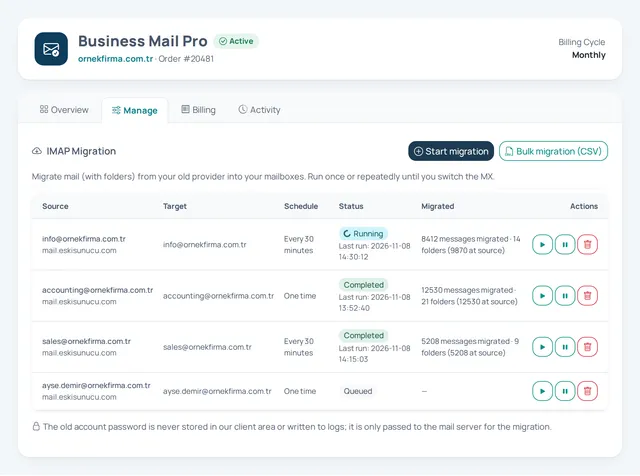
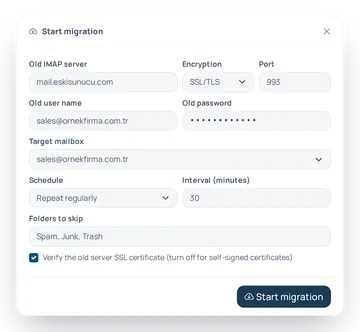
Screens shown with sample data.
- cPanel
- Plesk
- DirectAdmin
- Google Workspace · Gmail
- Yandex
- Any other IMAP server
- Outlook PST file
Google and Yandex accounts may require IMAP access to be enabled and an app password.
Have an Outlook PST file?
No access to the old server any more? Upload the PST file you exported from Outlook (up to 10 GB) in the client area and it is imported into your mailbox with its folder structure intact.
- If the connection drops, the upload resumes where it stopped
- The file is processed in an isolated environment and deleted from the server when the job ends
- You get an email when the import is complete
A seamless switch in four steps
- Step 1
Create your mailboxes
Create mailboxes in the client area; you can keep the same names as your old addresses.
- Step 2
Connect the old server
Enter the IMAP server and account details, or add the whole team with one CSV file.
- Step 3
Let it migrate
Folders and messages are copied; regular syncing keeps bringing over new mail.
- Step 4
Switch your MX
Once DNS points to us, run a final sync and stop the job; no message is left behind.
Live in three steps
- Step 1
Your domain
Use a domain you already own or register a new one with us.
- Step 2
DNS records
If your domain is with us, the records are added automatically; otherwise you get exact copy-and-paste instructions.
- Step 3
Mailboxes
Create mailboxes, set passwords and start sending from your client area.
Lost mail, suspicious sign-ins, "did it arrive?": all in your client area
Check, restore and decide for yourself in the client area, without opening a support ticket.
Email archive Add-on
A tamper-proof copy of every incoming and outgoing message for your domain, in a separate archive quota. It stays in the archive even if a user deletes it; search by sender, recipient, subject, text and date, and download as .eml. Retention and storage depend on the archive tier you choose.
Restore deleted mail
Deleted messages, including those emptied from Trash, are kept for 30 days. Pick them in the client area and restore them to their original folder; this retention does not count against your quota.
Two-factor authentication
A Google or Microsoft Authenticator code at webmail sign-in. Enforce it across your whole domain, and as an admin reset users who lose their phone.
App passwords
With two-factor authentication on, mail apps use a separate password per device. The mailbox password alone does not work for IMAP, SMTP or ActiveSync.
Delivery log
Incoming and outgoing mail for the last 30 days: delivered, deferred, bounced or rejected. Filter by address, status, direction and day.
Quarantine and digest
Messages held as suspected spam or malware wait for 30 days. Review their headers, release them to the inbox or delete them, and get an hourly, daily or weekly digest email per mailbox.
Infrastructure that is thought through for you
Your business email is not a side feature of web hosting; it runs on its own server, by its own rules.
Dedicated mail server
Your email does not share a server with your website; traffic spikes on the site do not affect your mail.
Reputable delivery
Outgoing mail goes through a professional relay network built for deliverability.
RAID10 and daily backups
Data lives on RAID10 disks and is backed up, encrypted, to a separate server every night.
Abuse protection
Hourly sending limits and automatic monitoring protect your domain's reputation.
Encrypted everywhere
Webmail, IMAP, POP3 and SMTP connections are encrypted with TLS.
Features that make your KVKK and VERBIS processes easier
Your mailboxes, email archive and backups are stored on our own servers in Türkiye. We state clearly where your data lives and how it is protected.
- Webmail, IMAP, POP3, SMTP and ActiveSync connections are encrypted with TLS
- Messages are stored encrypted on the server
- Backups are encrypted with AES-256 and kept on our own servers
- Delivery logs and access logs are kept
- Two-factor authentication can be enforced across your whole domain
- An optional email archive keeps a tamper-proof copy (add-on)
Outgoing mail is delivered over the internet so that it can reach the recipient's mail server.
A clean, fast webmail
Sign in at webmail.gyrohosting.com or straight from your client area with one click.
- Works in every modern browser, on desktop and mobile
- Folders, filters, signatures and out-of-office replies
- One-click sign-in from your client area
- Add it to your phone's home screen as "Gyro Mail" and it opens full screen
Can I use my own domain?
How does the migration from my old provider work?
Will my email stop while I switch?
Can I use Outlook and my phone?
Do I need cPanel or another control panel?
Can I add mailboxes or storage later?
Can I migrate the whole team's mail at once?
What happens to my mail if I cancel?
Will my calendar and contacts sync with my phone too?
My old mail is in an Outlook PST file. Can I import it?
Can I recover messages I deleted by mistake?
With two-factor authentication on, how do Outlook and my phone connect?
Where is my email stored?
Not sure which plan fits you?
Tell us what you need and our team will recommend the right setup within minutes.
Reach Sales & Support
Have a question before you buy, or need help with an existing account? Call or email us.